Introduction
Hobbyboard turns folders of photos, sketches, and screenshots into a searchable archive with semantic search, enriched tags, and beautiful boards — all on your own machine.
Quick Start
Get up and running in seconds. Select your platform below:
Option 1: Homebrew (Recommended)
brew tap aravindhsampath/tap
brew install hobbyboard
hobbyboard
# Open http://localhost:9625
Option 2: Docker Compose
curl -O https://raw.githubusercontent.com/aravindhsampath/hobbyboard/main/docker-compose.yml
docker compose up -d
# Open http://localhost:9625Installation Options
Hobbyboard offers flexibility for every type of user. Other installation options are listed below.
1. Package Managers (Recommended)
Use your OS package manager (brew, yum, apt, pacman). Example with Homebrew:
brew tap aravindhsampath/tap
brew install hobbyboard2. Docker Compose
Easiest container setup via compose.
curl -O https://raw.githubusercontent.com/aravindhsampath/hobbyboard/main/docker-compose.yml
docker compose up -d
# Open http://localhost:96253. Docker Image Direct
Run the official image without compose:
docker run -d \
    --name hobbyboard \
    -p 9625:9625 \
    -v hb-config:/app/config \
    -v hb-data:/app/dist \
    -v ./raw_images:/app/raw_images \
    --add-host=host.docker.internal:host-gateway \
    ghcr.io/aravindhsampath/hobbyboard:latest
# Open http://localhost:9625
4. Pre-built Binaries
Download the latest release for your OS. Note: Requires ffmpeg and libheif to be installed on your system.
| Platform | Dependencies Command |
|---|---|
| macOS | brew install ffmpeg libheif |
| Ubuntu/Debian | sudo apt install ffmpeg libheif-dev |
5. Build from Source (Cargo)
For developers who want the latest changes. Requires Rust toolchain.
git clone https://github.com/aravindhsampath/hobbyboard.git
cd hobbyboard
cargo build --release
./target/release/hobbyboard serve
Configuration
Hobbyboard is configured via a hobbyboard.toml file. On first launch, a default file is created in your working directory.
Most knobs you want to turn live here. Customize away.
Configuration Reference
| Section | Setting | What it does | Default |
|---|---|---|---|
| [paths] | raw_media_dir |
Your image hoard location. Read-only (we promise). | "raw_images" |
dist_dir |
Where we dump thumbnails, DBs, and metadata. | "dist" |
|
| [ai] | provider |
ollama (free/slow), openai, or gemini. |
"ollama" |
vision_model |
The eyes. e.g., qwen3-vl:8b, gemini-3-flash-preview, gpt-5-mini. |
"qwen3-vl:8b" |
|
embedding_model |
Text-to-vector model loaded in-memory by Hobbyboard. | "mxbai-embed-large-v1" |
|
| [server] | host |
0.0.0.0 to expose to your LAN. |
"0.0.0.0" |
port |
Why 9625? I mashed the numpad. | 9625 |
|
| [logging] | level |
Minimum log level: trace, debug, info, warn, error. | "info" |
file_max_size_mb |
Max log file size in MB before rotation. | 50 |
|
| [search] | vector_weight |
0.0–1.0. Higher = more concept/vibe matching. | 0.3 |
fts_weight |
0.0–1.0. Higher = exact keyword matching. | 0.7 |
|
| [search.fts_weights] | manual_tags |
Multiplier. If you typed it, it matters more. | 2.0 |
user_notes |
Multiplier. Your notes matter too. | 2.0 |
|
caption |
Multiplier. AI description weight. | 1.0 |
|
auto_tags |
Multiplier. AI tags weight. | 1.0 |
|
ocr |
Multiplier. Text found inside images. | 0.8 |
Notes on AI Configuration
Vision models are configured via [ai].vision_model. You can customize [ai].prompt_analysis for domain-specific indexing.
| Provider | Recommended Model | Use Case |
|---|---|---|
| Ollama | qwen3-vl:8b |
Slow but local performance and privacy. |
| OpenAI | gpt-5-mini |
High accuracy, low cost, requires API key. |
| Gemini | gemini-3-flash-preview |
Excellent OCR and fast processing. |
Embedding models run locally via fastembed-rs and are set via [ai].embedding_model.
| Model | Dimensions | Size | Latency (Apple Silicon M2) |
|---|---|---|---|
| nomic-embed-text-v1.5 | 768 | ~275 MB | 14 ms |
| mxbai-embed-large-v1 | 1024 | ~670 MB | 34 ms |
| Alibaba-NLP/gte-large-en-v1.5 | 1024 | ~1.6 GB | 42 ms |
Technical Design
This section explains the end-to-end architecture for engineers who want to understand, self-host, or adapt Hobbyboard. Everything runs in a single binary — no external services required.
System Architecture


- Single binary: Axum web server + SQLite + USearch vector index + fastembed-rs embeddings. No external services required.
- Frontend: Vanilla JS/CSS/HTML embedded in the binary via
rust-embed. Zero build tools needed. - AI: Vision analysis via Ollama (local), OpenAI, or Gemini. Text embeddings are always generated locally by fastembed-rs — no API calls for search.
Control Flow & Auto-Dispatch
Running hobbyboard with no subcommand triggers auto-dispatch based on system state:


Explicit subcommands (setup, init, build, serve, export, auth reset) bypass auto-dispatch and run directly.
First Run & Onboarding
- Run
hobbyboard→ no config found → onboarding web UI starts on port 9625. - Wizard checks dependencies (ffmpeg, libheif codecs).
- User configures: AI provider, media source path, password, embedding model.
- Wizard writes
hobbyboard.toml+.env(API keys, password hash, signing key). - Triggers
init(creates SQLite DB + USearch index) thenbuild(processes media). - Process restarts via
exec()→ auto-dispatch detects config + DB → normal serve mode.
hobbyboard.toml, .env, dist/data/hobbyboard.db, dist/data/vectors.usearch, dist/images/ (thumbnails).
Build Pipeline (Image Lifecycle)
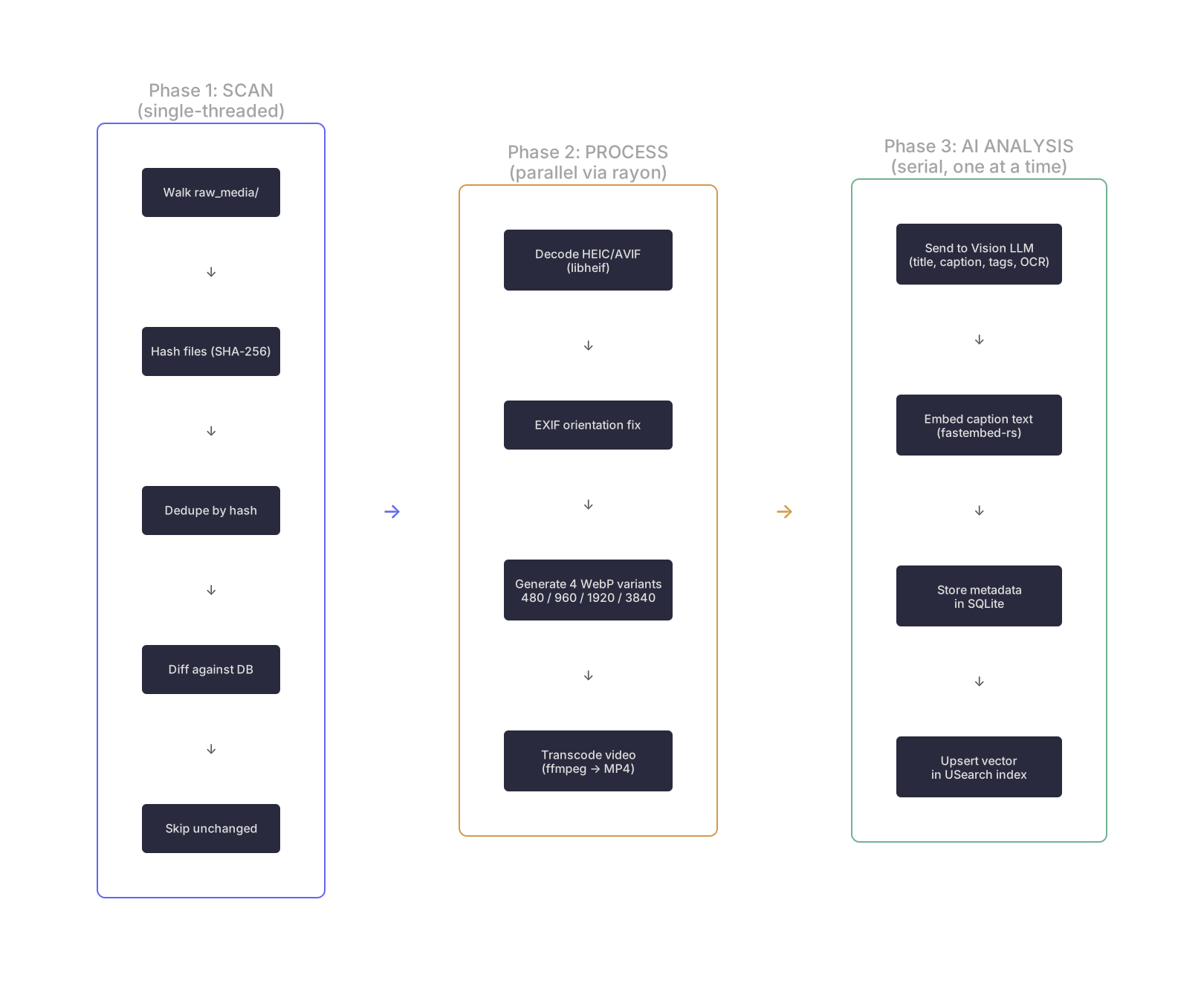
The build command runs a 3-phase pipeline orchestrated by src/ops/library.rs:
- Item ID: First 16 chars of the SHA-256 hash of the file content. Same content = same ID (deduplication).
- Supported formats: jpg, jpeg, png, webp, heic, avif (images); mp4, mov, webm, m4v (videos).
- Thumbnails: 4 WebP size variants stored under
dist/images/{thumb,sm,md,lg}/. - Video: Transcoded to MP4 via ffmpeg; frame thumbnails extracted for the grid view.
- AI output: Structured JSON —
title,caption(dense description),tags[](10–12 keywords),ocr(visible text or null).
Search & Retrieval
Search is hybrid: semantic vectors + full-text, fused with configurable weights.


- Vector search: USearch HNSW index with cosine similarity. Embeddings are generated locally by fastembed-rs — no API calls at query time.
- Text search: SQLite FTS5 with BM25 ranking across title, caption, auto_tags, ocr_text, manual_tags, and user_notes.
- Score fusion:
combined = (vec_score × vector_weight) + (fts_score × fts_weight). Default: 30% vector, 70% FTS. Tune via[search]in the config. - "More like this": The
/api/similar/{id}endpoint returns cosine-nearest neighbors from the USearch index.
Data Model
All structured data lives in a single SQLite database (dist/data/hobbyboard.db, WAL mode). The USearch vector index (dist/data/vectors.usearch) is an on-disk cache — SQLite is the source of truth for embeddings.


--refresh wipes AI-generated data (items, generated_metadata, vector_keys, FTS) but always preserves user_tags, user_notes, and boards.
Directory Layout
In Docker, these map to named volumes: hb-config (hobbyboard.toml + .env) and hb-data (dist/). The HB_CONFIG_DIR, HB_DIST_DIR, and HB_RAW_MEDIA_DIR env vars override default paths.
Operational Invariants
- Embedding model lock: On serve startup, the app checks that
system_info.embedding_modelmatches the config. Mismatches are fatal — you mustbuild --refreshto re-embed with a new model. - Content-addressed identity: Item IDs are derived from file content (SHA-256), so the same file always gets the same ID regardless of filename or location.
- SQLite is source of truth: The USearch
.usearchfile is a cache rebuilt from thevector_keystable on each build. Delete it and the next build recreates it.
Failure Modes
- Missing ffmpeg: Video transcoding is skipped; build continues with image-only processing.
- Missing libheif: HEIC/AVIF decoding fails for those formats; other image formats still process.
- AI provider unreachable: Vision analysis fails for that item; item metadata is not created. Retryable on next build.
- Embedding model mismatch: Server refuses to start. Fix by running
build --refreshwith the correct model configured. - Refresh build: AI metadata is reset; manual tags and notes are preserved but may reference items not yet re-processed.
Key Dependencies
| Category | Crate / Tool | Role |
|---|---|---|
| Web | axum + tokio + tower | Async web server, middleware, routing |
| Database | rusqlite | SQLite bindings (WAL mode, FTS5) |
| Vectors | usearch | HNSW approximate nearest neighbor index |
| Embeddings | fastembed | Local text embedding inference (ONNX) |
| Images | image + libheif-rs | Image decoding, resizing, HEIC/AVIF support |
| Video | ffmpeg (sidecar) | Transcode to MP4, extract frame thumbnails |
| AI | reqwest | HTTP client for Ollama, OpenAI, Gemini APIs |
| Auth | argon2 + jsonwebtoken | Password hashing, JWT session tokens |
| CLI | clap | Command-line argument parsing |
| Frontend | rust-embed | Embeds HTML/JS/CSS into the binary |
| Serialization | serde + serde_json | Config parsing, API request/response |
| Logging | tracing | Structured logging with daily rotation |
| Hashing | sha2 | Content-addressed file identity |
Usage & Workflow
Hobbyboard operates in two modes: the CLI (for management and builds) and the Web UI (for browsing, searching, and organizing).
CLI Reference
The binary is a single-command orchestrator. All subcommands share the same config and storage.
Core Workflow
Or just run hobbyboard with no arguments — auto-dispatch handles the right action based on system state.
1. Setup Wizard
hobbyboard setup- What it does: Launches an interactive web UI (port 9625) that walks you through AI provider selection, media path, password, and embedding model.
- Dependency check: Verifies ffmpeg and libheif (heif-info/heif-enc) are available.
- Output: Writes
hobbyboard.tomland.envwith your settings.
2. Library Initialization
hobbyboard init- SQLite: Creates
dist/data/hobbyboard.dbwith all tables and the FTS5 index. - USearch: Initializes the HNSW vector index file at
dist/data/vectors.usearchwith the correct dimensions for your embedding model. - Idempotent: Safe to run multiple times; won't overwrite existing data.
3. Build (Ingestion & Indexing)
hobbyboard build [--refresh] [--deep]--refresh: Wipes AI-generated metadata (descriptions, tags, embeddings) but preserves user data (manual tags, boards, notes). Use when changing AI provider or prompt.--deep: Full SHA-256 re-hash of every file to detect content changes that didn't update filesystem timestamps.
Pipeline stages:
- Scan: Walk directory, hash files (SHA-256), diff against DB, skip unchanged.
- Process (parallel): Generate 4 WebP thumbnail variants (480/960/1920/3840px), transcode video to MP4, apply EXIF orientation.
- AI Analysis (serial): Send media to vision LLM, embed caption via fastembed-rs, store metadata + vector.
4. Serve
hobbyboard serve [--port 9625] [--ui-path ./frontend]- Default port: 9625
- Frontend: Served from the embedded binary (via rust-embed), or from a local directory if
--ui-pathis set (useful for UI development). - Auth: Password-based login with Argon2 hashing. Sessions use JWT cookies (
hb_session) or Bearer tokens for API access. - Search: Hybrid vector + FTS5 queries with configurable weights.
5. Other Commands
| Command | Description |
|---|---|
hobbyboard export | Export all data (Google Takeout style archive). |
hobbyboard auth reset | Reset the admin password interactively. |
Environment Variables (.env)
Secrets and overrides are stored in .env (loaded automatically from HB_CONFIG_DIR or CWD):
| Variable | Purpose |
|---|---|
OPENAI_API_KEY | Required when [ai].provider = "openai" |
GEMINI_API_KEY | Required when [ai].provider = "gemini" |
HB_PASSWORD_HASH | Argon2 password hash (set by setup wizard) |
HB_SIGNING_KEY | JWT session signing secret (set by setup wizard) |
HB_CONFIG_DIR | Override config directory (default: CWD). Used in Docker. |
HB_DIST_DIR | Override dist directory (default: dist/). |
HB_RAW_MEDIA_DIR | Override raw media directory. |
Logs
Logs are written to both stdout and dist/logs/hobbyboard.log (rotating, max 50 MB). In Docker:
docker compose logs -f hobbyboardTroubleshooting
| Symptom | Cause | Fix |
|---|---|---|
| Server refuses to start with model mismatch error | Embedding model in config differs from what's stored in DB | Run hobbyboard build --refresh |
| HEIC/AVIF images show as broken | libheif not installed or missing codecs | Install libheif + libaom + libdav1d |
| Videos not processed | ffmpeg not in PATH | Install ffmpeg |
| Search returns no results | Build hasn't run or completed | Run hobbyboard build and check logs |
| Docker: loops back to onboarding after restart | Config check wasn't using HB_CONFIG_DIR | Update to latest image |
Code Map
For engineers adapting Hobbyboard or contributing. The codebase is ~12,700 lines of Rust + ~1,400 lines of frontend JavaScript.
| Path | What it does |
|---|---|
src/main.rs | CLI entry point, clap dispatch, auto-start logic |
src/config.rs | Config loading, defaults, TOML serialization, env var handling |
src/logging.rs | Tracing setup with daily file rotation |
src/ops/library.rs | Build pipeline orchestrator (scan → process → AI) |
src/media/scanner.rs | Directory walker, file hashing, change detection |
src/media/processor.rs | Image resizing (WebP variants), video transcoding (ffmpeg) |
src/ai/client.rs | Multi-provider AI client (Ollama, OpenAI, Gemini) |
src/ai/embedding.rs | fastembed-rs wrapper for local text embeddings |
src/ai/schema.rs | Vision analysis JSON schema (title, caption, tags, OCR) |
src/db/mod.rs | Schema creation, migrations, connection setup |
src/db/items.rs | Item CRUD, catalog queries, FTS operations |
src/db/vectors.rs | USearch index management, vector upsert/search |
src/server/mod.rs | Axum router, JWT auth middleware, CORS |
src/server/handlers.rs | All REST API endpoints (~1,200 lines) |
frontend/app.js | Single-file SPA: grid, search, lightbox, boards, tags |